
Figma Agent: A first look

There are plenty of reasons to hate on AI these days. Copyright concerns, absurd power consumption, layoffs, and an endless stream of AI slop should be enough to make anyone want to boycott the whole thing. If it weren’t for the capabilities.
And those capabilities have been creeping toward the design world for quite a while. So when a beta invite to Figma Agent landed in my inbox, I was genuinely curious. Figma will now take your prompts and generate directly on the canvas. Is this the tipping point for AI in design?
The basics
If you have beta access, there are two entry points for letting Figma design for you: the first one is through a sidebar, much like other vibe coding tools out there.

In addition to this, there is a star icon whenever you select something, letting you fire off prompts directly from there. The jury's still out on whether this icon will be annoying or not 😊

First test: Can it draw?
Let's start with a basic, yet fundamental skill: can it help out with drawing stuff? I was working on some sketches of a minimal chess piece set, and deliberately left out the pawn for the agent to generate. I selected the five remaining pieces and asked the agent to generate a pawn based on the style.

Unfortunately, the result was nothing more than a waste of power, credits and patience on my end: A buggy drawing that completely missed the visual qualities of the original set. After dismissing this and adding my homemade pawn, I asked the agent to order them nicely into a chess board. A chore that would actually be nice to offload, but this too failed badly, returning a 3x3 board full of bugs.
I'm not overly surprised: generative AI seem to struggle to do meaningful work in the realm of icons. There is however some promise in getting vector designs back, opening the door for tweaks and further refinements by a human. But all in all, this first attempt was nowhere near helpful.
Second test: Make a slide deck
After the previous round crashed and burned, I figured I should meet the tool halfway. It have probably been trained on a ton of presentation decks, so I asked it to create one for Nest of the North, a fictional Norwegian treehouse business.

During the reasoning, it concludes with "The reference image shows a theme with earthy tones, clean typographic hierarchy, bold statement slides, and image-forward compositions. This maps perfectly to the Nordic forest aesthetic." Sounds promising.
After a few minutes I get my results back, and it is definitely more useful than my first test. Bit generic perhaps, and some minor bugs, but this could be a starting point for further slide design work.

I'd say it needs a few real images and some premium typefaces that haven't yet been overused, but the layout part isn't too shabby. It's all wrapped in auto layout, which I feel is a little constraining at this stage, but anyway: this feels like an improved version of their First Draft feature, and might actually hold some promise.

Test 3: Make a signup flow
A Figma file with a massive design system, providing lots of juicy context for the prompt. That sounds like the perfect environment for this agent to work.
Here I tasked it to create a signup flow for an old app we worked on. I'd say it worked quite well. It made a decent flow, figured out the inputs and buttons, and generated new icons for the ones it didn't find. One of the existing illustrations found its way in there, which was nice to see, while the rest was generated on the fly (and kinda ruined it, but let's treat them as placeholders).
If the goal here is to have an okay starting point, prompt a few different takes, or just make something decent very quickly, then it seems to be up for the task.

Putting in two of the original screens here for reference:

Test 4: Make a business card
If I provide the logo, can I get a nice business card in return? Apparently not. The logo was recreated as a generic symbol, and the type is honestly too small. This would need quite a bit of massaging, so I might as well have made this from scratch.

Test 5: Design an article
Back to familiar territory. I have a feeling that an article layout will reap better results, so I make a styleframe to give visual direction:

Now I prompted it with "create a magazine type article about testing the Figma Agent (design capabilities in the canvas), using this [image] as a reference and go for a techy, wired magazine-style layout". Below is the result:

Pretty dope! The image above is what was generated, with zero tweaks.
I’m conflicted here. The fact that this came from one reference image and a single sentence feels kind of incredible. If the jump from idea to 90% finished is this quick, I would be surprised if this doesn't end up in our workflows, next to the other AI tools we rely on.
Still, part of me pushes back: is this really how you're supposed to design something truly brilliant? By rolling the dice and waiting for a result to appear? "Output isn't design", as Karri Saarinen beautifully put it, and I think these kinds of capabilities encourage you to fast-forward through a lot of the important design phases.
Another problematic part of this process is iteration. Selecting your designs and prompting for changes takes too long to support a workflow that actually flows. An exception is the more complex components, like date pickers and graphs, which take longer to draw manually.

Adding variables
Messing around with variables is a job I welcome AI to help me out with. I screenshotted some colors and asked it to set up a color palette inside the variables section, and it did that job perfectly in 50 seconds.
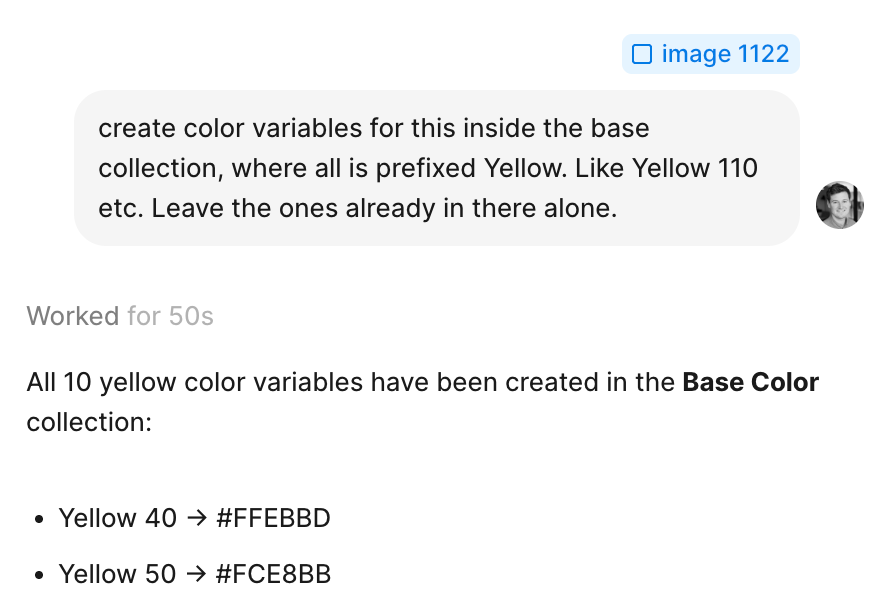
Another test was to inspect a layout grid and set up variables based on that. Here it misunderstood a few values, and the names were off. So a bit of hit and miss overall for variables, but certainly some light at the end of the chore tunnel here.
Conclusion
As far as the UI goes, I think Figma did a great job implementing this. I know these things aren't easy to shoehorn into an existing product. When zooming out, it’s pretty amazing how far design software has come, and the speed we’re operating at now compared to the old Photoshop era.
Like most LLM-powered tools, though, the technology feels like it swings between amazingly capable and completely clueless. You have to spend time to figure out where it excels. Certain types of busywork are no-brainers, like adding variables.
But even when it enables you and saves you time, I think there are some traps hidden in the AI-based workflow. The trap of believing something is good simply because the machine made it, instead of trusting your own instincts. The trap of relying on generated output rather than sharpening your own taste and technique. And the trap of flooding your design files with so much instant output that everything becomes a giant mess.
I’m sure I’ll use this feature as a supporting tool in my work, much like I already use other AI tools today. On select tasks in the beginning, and more if/when the speed and quality of these models improve. But I’ll be very cautious about protecting the fundamentals along the way: sharpening my eye, refining my taste, and respecting the time it takes to make something really shine.
Happy designing, with or without an agent 🚀